iServe is the restaurant POS we engineered for dine-in, takeaway and delivery. It sends tickets straight to the kitchen and deducts every ingredient from stock, and it runs on your local network, so billing continues when the internet doesn't. Follow one order through.
One screen for every order type, with tables, customer names and delivery addresses.
Sizes, extra cheese, sauces: each priced and sent to the kitchen with the item.
Guests scan a code at the table and order over your own Wi-Fi.
Every bill posts to FBR, with the invoice number and QR code on the receipt.
KOTs print or appear on the kitchen display, with a timer on every ticket.
Every dish deducts its ingredients, and packaged items are counted as they sell.
Record what's discarded, so stock and profit figures stay accurate.
Receipts at the counter and tickets in the kitchen, on standard hardware.
Cash in, cash out and a reconciliation at the close of every shift.
Log daily expenses at the counter, so the till always balances.
Sales, best sellers and profit after ingredient costs, by day or month.
Cashier, kitchen and manager each see only what their role requires.
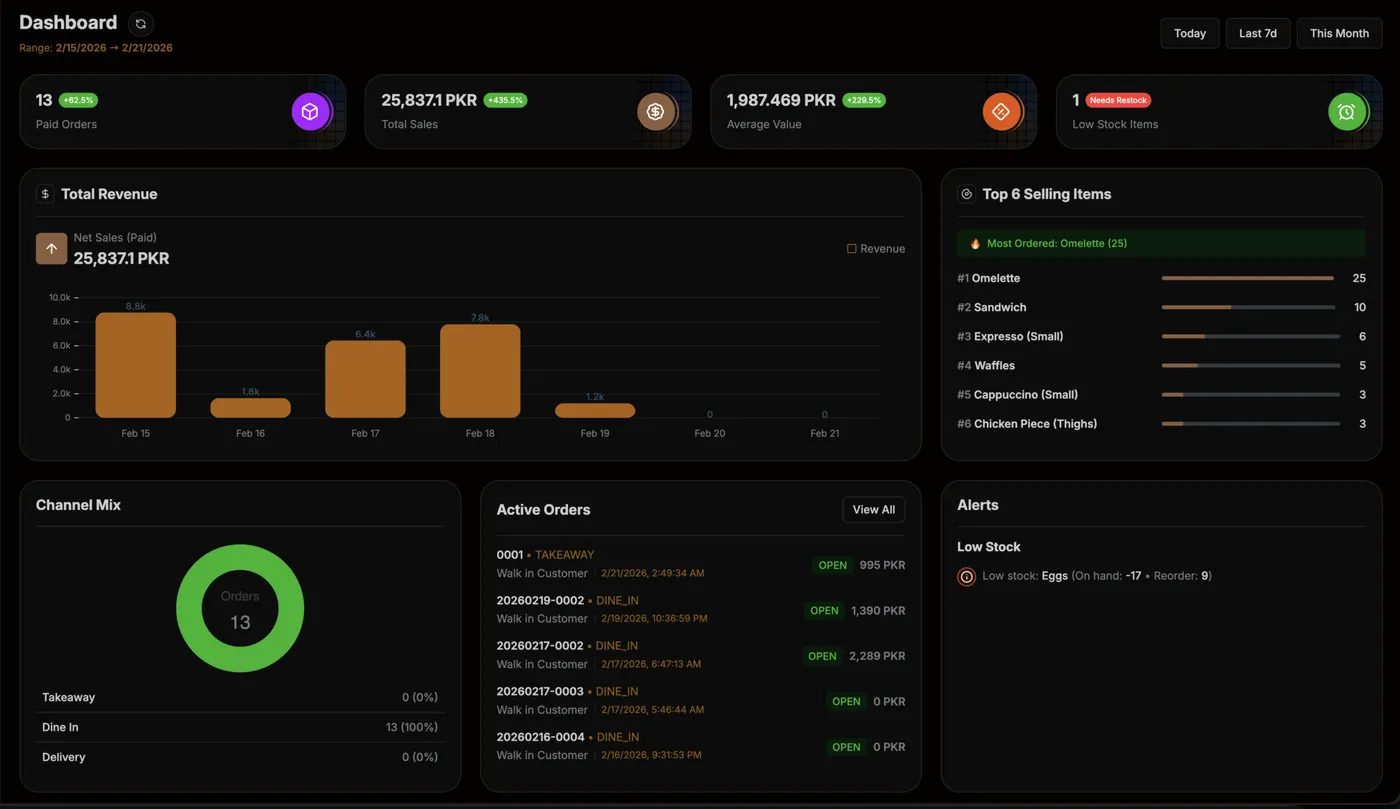
Sales, order types, best sellers and stock alerts on one dashboard, at the counter or from anywhere.

The real iServe dashboard, from a test week.
See which dishes and drinks earn the most, and which to retire.
How your orders split, so you staff the right station.
Ingredients below their reorder level are flagged before you run out.
Have another question? Ask on WhatsApp and a member of our team will reply.
Ask us on WhatsApp → Pairs well withYes. iServe runs on your local network, so billing, kitchen tickets, stock, shifts and reports keep working when the internet is down.
Yes. Every bill posts to FBR, with the invoice number and QR code printed on the receipt.
Yes. Dine-in, takeaway and delivery orders run on one screen, with the customer's name, phone and delivery address.
The billing screen shows every item with its photo, so new cashiers learn it fast. Role-based access keeps kitchen, counter and managers on their own screens.
A Windows computer or Android tablet at the counter, a standard 80 mm thermal printer, and a display or printer in the kitchen. We'll help you choose the right setup.
iServe has quarterly and yearly plans plus a one-time setup fee. Book a demo on iservepos.pk and we'll recommend the right plan for your counters.
Leave your number and we'll walk you through a full service, from the first order to closing the shift.
Or reach us directly